前言
开发本纯静态博客时,想对背景,顶图,底图等进行随机切换。由于该主题在一些地方没有添加随机图片功能,改源码又比较麻烦,所以笔者打算部署一个自己的随机图库 API。笔者又没有多少米,所以依赖各大厂商的 free 套餐,部署一个免费的随机图库 API。
想要开发一个这样的 API,对于我来说,有以下需求:
- 随机返回图片
- 对图片进行分类
- 部署简单
- 免费,免费,还是免费
通过查询,最终选择了 Cloudflare 的 Workers & Pages 进行云部署 JS 代码 + GitHub 仓库 存放图片的方案。
部署教程
步骤一:创建 GitHub 图片仓库
注册登录 Cloudflare 和 GitHub 就不再赘述。
首先,在 GitHub 中创建一个图片仓库,可以参考以下文件夹结构:
1
2
3
4
5
6
7
8
9
| ├───test
│ ├───1.jpg
│ ├───2.jpg
│ ├───3.jpg
├───background
| ├───1.jpg
| ├───2.jpg
| ├───3.jpg
......
|
即直接按分类作为仓库目录存放图片,图片格式为 数字+后缀名。
步骤二:部署 Cloudflare Worker
接下来,进入 Cloudflare 的 Workers & Pages 页面,依次选择:
- 新建应用 (Create application)
- Start with Hello World!
- 起一个 Worker 名字,点击 Deploy
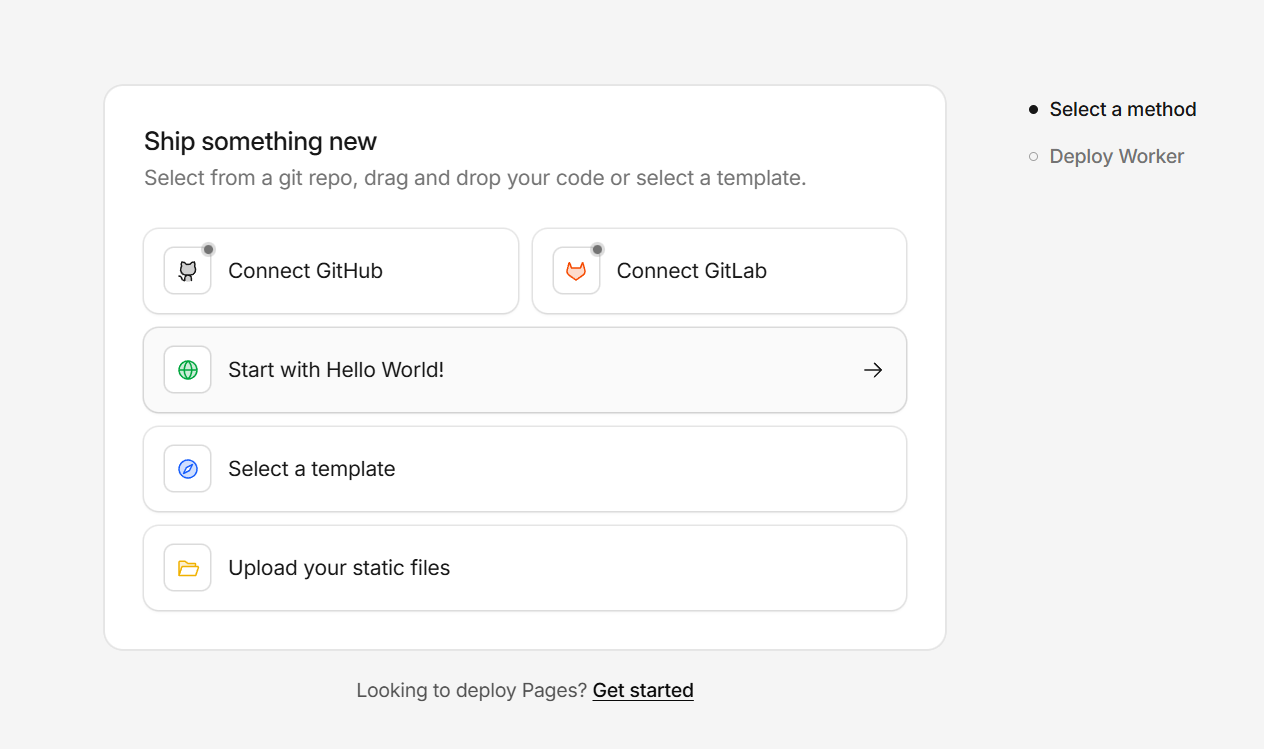
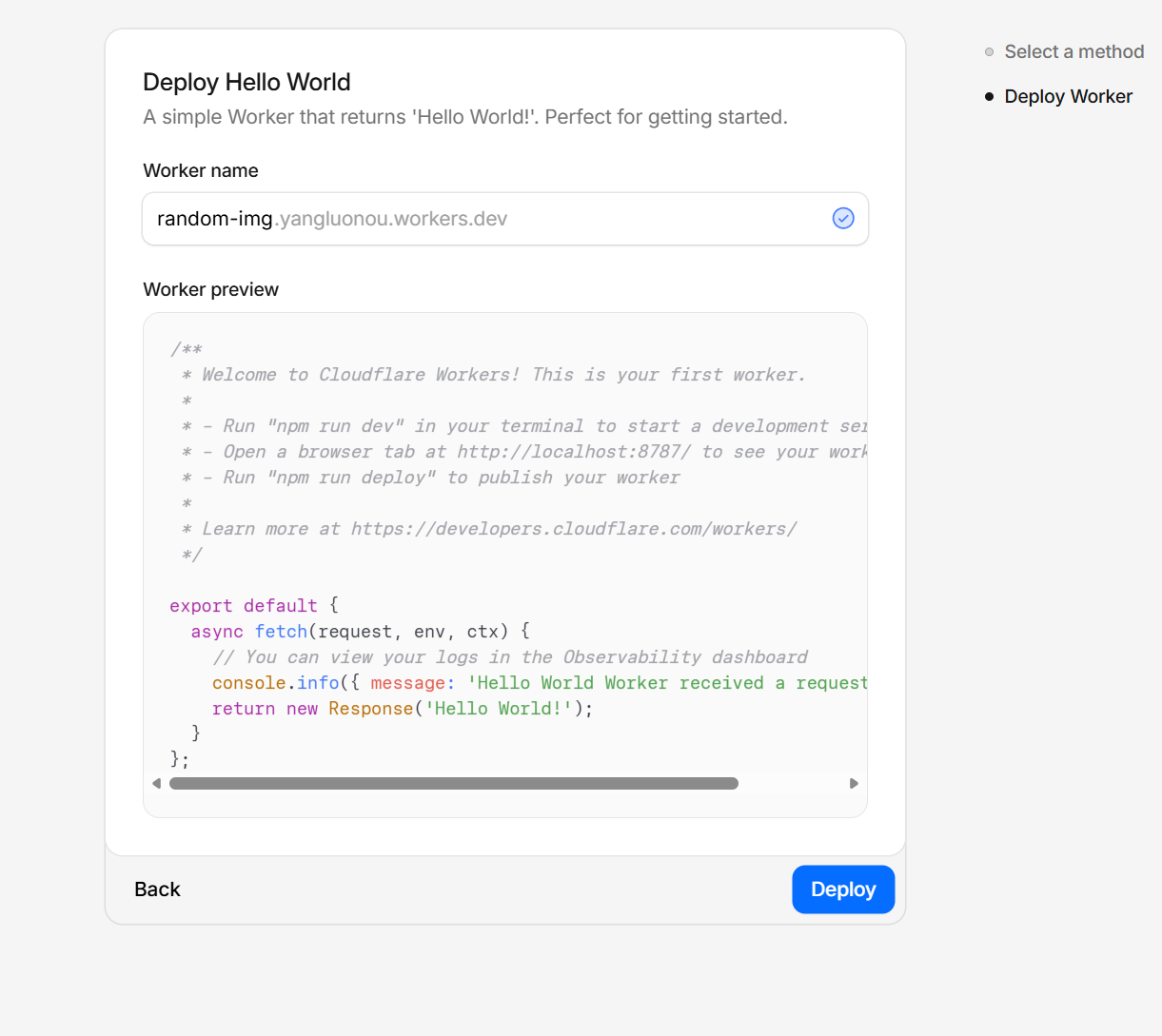
步骤三:替换 Worker 代码
点开你刚刚创建的 Worker,点击右上角的 Edit code,替换以下代码:
1
2
3
4
5
6
7
8
9
10
11
12
13
14
15
16
17
18
19
20
21
22
23
24
25
26
27
28
29
30
31
32
33
34
35
36
37
38
39
40
41
42
43
44
45
46
47
48
49
50
51
52
53
54
55
56
57
58
59
60
61
|
const GITHUB_USERNAME = 'UserName';
const REPO_NAME = 'image-gallery';
const REPO_BRANCH = 'main';
const BASE_DOMAIN = `https://raw.githubusercontent.com/${GITHUB_USERNAME}/\${REPO_NAME}/${REPO_BRANCH}`;
const CATEGORIES = {
'test': {
count: 2,
path: '/test/',
ext: '.png'
},
};
const DEFAULT_CATEGORY_KEY = 'test';
addEventListener('fetch', event => {
event.respondWith(handleRequest(event.request));
});
async function handleRequest(request) {
const url = new URL(request.url);
const pathSegments = url.pathname.split('/').filter(Boolean);
let categoryKey = DEFAULT_CATEGORY_KEY;
if (pathSegments.length > 0) {
categoryKey = pathSegments[pathSegments.length - 1];
}
const categoryConfig = CATEGORIES[categoryKey];
if (!categoryConfig) {
return new Response(`Error: Category "${categoryKey}" not found.`, { status: 404 });
}
const randomIndex = Math.floor(Math.random() * categoryConfig.count) + 1;
const targetURL =
BASE_DOMAIN +
categoryConfig.path +
randomIndex +
categoryConfig.ext;
return Response.redirect(targetURL, 302);
}
|
步骤四:完成部署
修改完成后,点击 Deploy,等待部署完成,即可获得你自己的随机图库 API。
Free 套餐有每天 10 万次请求限制,足够大部分小型博客使用。
如果您觉得这篇文章对您有帮助的话,不妨收藏该页面,分享给更多朋友,感谢您的阅读。有问题欢迎评论区留言,共同交流。
评论区请友善交流,无关话题将会被删除
